Mika: Open-Source Android Agent That Uses Apps on a Hidden Screen
Mika is an open-source Android AI agent that runs apps and the web on a hidden background display—no root, bring your own model key, now callable via MCP.
The awkward thing about phone agents is that once they start working, your phone is no longer yours. Mika, newly open-sourced by developer Wang Zan, takes a different route: tasks run on a background screen you never see, so you keep scrolling and texting up front while it opens WeChat, reads Xiaohongshu or compares flights behind the scenes.
Mika is an Android app driven by one sentence. Ask it to message someone on WeChat and it launches the app on a virtual display the same size as your main screen, finds the chat, types, sends and reports back. It works with the apps already installed and already signed in on your phone—no re-authorization, no separate cloud accounts. Web tasks go to a built-in desktop-class browser that keeps your logins, and a local Linux sandbox handles scripts.
The key part: no root and no PC. Mika borrows Android's own Wireless Debugging. Pair once on the phone and it starts a shell-level helper that creates the display and drives apps; the author even wrote his own ADB protocol implementation. On Android 14+ the virtual display has its own focus and never touches your main screen. Apps being driven in the background are muted, and sound comes back when you take over—small details that suggest the author lives with this thing daily.
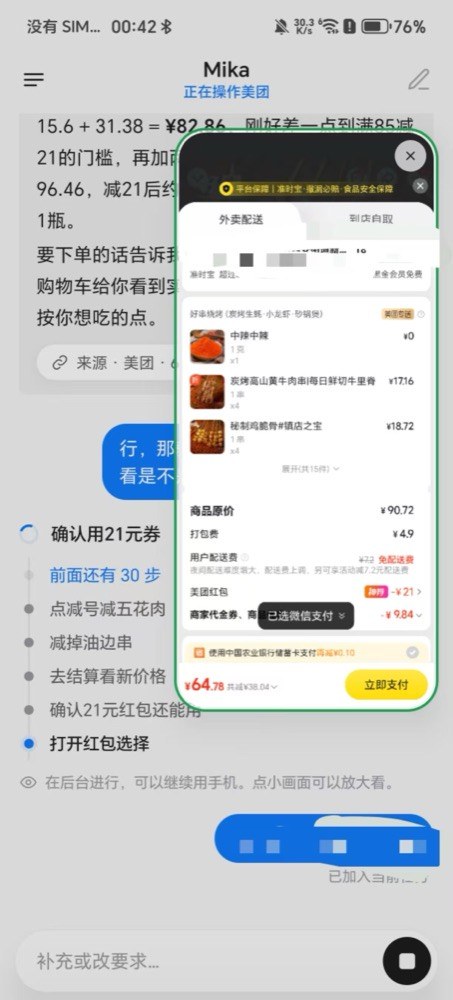
The boundaries are clear. Logins, verification codes and payments trigger a notification asking you to take over; the app moves to the main screen, you finish, hand it back, and Mika re-checks before continuing. Repo demos—ordering takeout on Meituan, adding a sub-$30 charger to an Amazon cart—stop before checkout. For apps with unreadable UIs, bundled OCR reads the screen, and a vision model can locate buttons directly.
There is no Mika server. You bring your own API key—OpenAI-compatible, Anthropic and Gemini endpoints all work—or sign in with a ChatGPT plan, or point it at a model on your LAN. Screen content goes only to the provider you configure.
On October 31 it added MCP. With the phone plugged into a computer, one command opens a token-protected connection so desktop tools like Claude Code or Cursor can assign Mika tasks, check progress and fetch results. LAN access is off by default, and payment confirmations still happen only on the phone. It is a smart move: desktop agents have never had a way into the mobile app ecosystem, and now they have a ready-made pair of hands.
The repo was created on the evening of October 29 and passed 1,000 stars in roughly 48 hours; it is now near 1,900. It is still a public beta—Android 11+ to install, 13+ to drive apps, arm64 only for the sandbox. But while big platforms build phone agents as closed system features, Mika shows that one developer and an ordinary Android phone can make "AI that uses your phone" installable, hackable and model-agnostic.