Vercel Labs agent-desktop: Computer Use for Your Whole Desktop
Vercel Labs open-sources agent-desktop: any coding agent can drive macOS, Windows and Linux apps via the OS accessibility tree—not screenshots.
Browser-only computer use was never going to be enough. Vercel Labs has pushed the same idea onto the whole machine: agent-desktop is now open source, so any coding agent can read and operate native apps on macOS, Windows and Linux—and by default it runs in the background without stealing your mouse focus.
It is the sibling of agent-browser. agent-browser handles the web; agent-desktop handles the desktop. Both bet on structured UI instead of screenshot-and-guess-pixels, which is expensive, slow and brittle the moment a layout shifts. agent-desktop reads the OS accessibility tree—Accessibility API on macOS, UI Automation on Windows, AT-SPI on Linux. A snapshot returns JSON with a ref for every actionable element; the agent clicks something like @snapshot:eN, snapshots again to verify, and keeps the loop in its own hands.
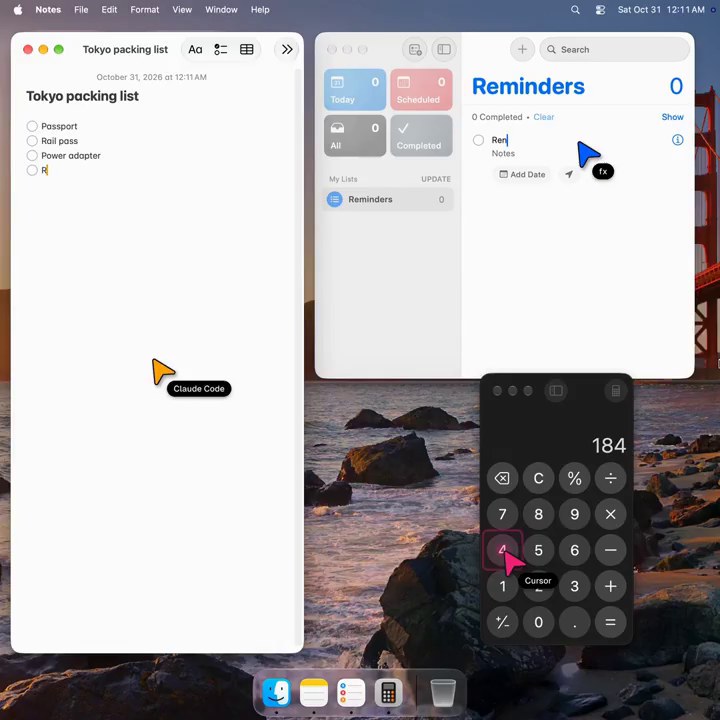
Officially, this is not another desktop agent with a model baked in. There is no LLM inside, no GUI and no interactive prompt—each command prints one JSON envelope and exits. The observe–act–verify loop lives in whatever you plug in: Claude Code, Cursor, or a plain script. The launch demo shows several agents working at once, each with its own cursor. Actions are headless by default, going through the accessibility APIs without moving the pointer; flip on --headed when you actually need physical mouse and keyboard input.
Setup is straightforward: npm install -g agent-desktop. The repo lives under vercel-labs, with docs at agent-browser.dev/desktop. Alongside the CLI there is a C library for in-process calls. The command surface is wide—observe, click and type, window management, clipboard, notifications, roughly sixty names—but what matters for agents is the ref contract: when the UI changes you get STALE_REF and take a fresh snapshot, instead of silently hitting the wrong row.
For developers that is a real unlock. Letting an AI poke System Settings, Finder, Slack or a local GUI tool used to mean fragile screenshot stacks or per-platform scripts. Now there is one cross-platform entry point with JSON output and safe retries. Unlike Computer Use products that lock the capability to a single vendor model, agent-desktop is deliberately a tool any agent can call—swap the model, keep the desktop layer.
It still inherits the limits of accessibility trees: if an app exposes nothing, agent-desktop cannot see it. Snapshots, screenshots and clipboard reads can contain private desktop content, and the docs warn against dumping them into public logs. The direction, though, is clear. Computer use is growing from “can click a browser” into “can drive the whole machine,” and Vercel Labs just gave developers a reproducible path that does not hitch that capability to one model.