Avoid the massive end-to-end tax of default full history clones
It's easy to think of git clone as a client-side operation, but the settings of this operation impact the server side and all networks in between.
When you run a default full history clone, the server has to walk the entire history, build a pack file for it (that's what "counting objects" is actually doing), and ship it over the wire. The client then unpacks all of it and checks out a full working tree.
Every layer, client CPU, network, the Git server's pack-building compute, and disk, pays for the size of that request. Make the request smaller and the whole stack gets cheaper at once, not just your laptop. Agentic AI turns up the pressure on this in a way normal developer workflows don't.
An agent doing repository work can clone far more often, and far less predictably, than a human ever would. If the default is a full history clone, you're now paying that tax at agent scale. GitLab is working hard on the backend to serve large repositories faster.
But you can also change what you ask for. Options like shallow clones (--depth=1), single-branch clones, and partial clones (--filter=blob:none) let you fetch only what a job actually needs. A more precise request immediately reduces peak load, unreliability, wait time, and cost.
And every future backend improvement compounds on top of these leaner requests. In Supercharge your Git workflows, I walked through how Git Much Faster benchmarks the settings that cut clone times by up to 93% and disk usage by up to 98%: disabling compression, widening the HTTP buffer, shallow and partial clones, and sparse checkout that skips binaries.
Great numbers. There's just one catch: Every place that clones the repo has to be meticulously updated with many lines of optimizing code. A developer's laptop, a CI job, an agent spinning up a sandbox: Each one is a separate opportunity to forget. That's not automation. That's hoping.
In this article, you will learn how to implement the Git Clone Override Policy to automatically enforce repository cloning optimizations and minimize costs.
Where the clone tax hits hardest Agentic AI is the newest and fastest growing pressure, but it's not the only place a default full history clone is costing the software industry dearly: Monorepos: Consolidating many projects into one repository means every clone pulls far more than any single team actually needs.
Complex, long-running Git history: Years of commits compound total repository size even when the current tree is modest. Media, binaries, and embedded projects: Firmware images, vendor SDKs, and design assets stored directly in version control balloon a repository the way source code alone never would.
CI/CD pipelines: A fresh clone on every job, run thousands of times a day, turns a small per-clone inefficiency into a large recurring one. Data science and machine learning data sets: Large data files tracked in git carry the same size tax as any other oversized blob.
Remote developer environments: Cloud-hosted or ephemeral development environments want fast, lightweight startup, but still default to a full repository replication. Agentic AI: Many more clone requests, but far less predictable than any human-driven workflow. Making the optimization impossible to skip The fix isn't a better README telling people which flags to set.
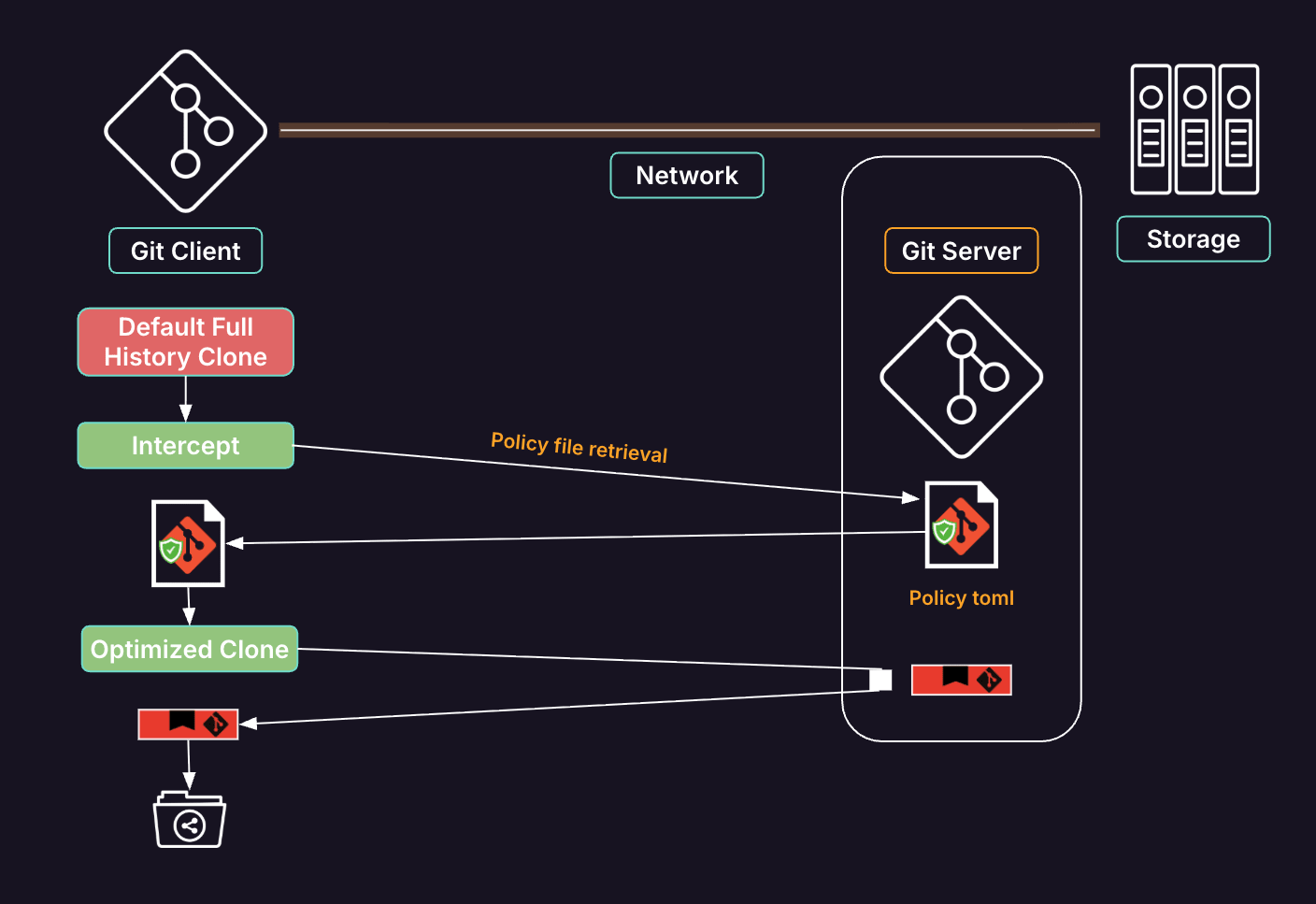
It's moving the decision out of individual hands entirely: Commit the policy to the repository itself, as code, and let a small program enforce it. That's what Git Clone Override Policy does. Drop a .afullhistorycloneoverridepolicy.toml file in a repo, and a lightweight Go binary intercepts only a bare git clone URL, the plain, default, full-history request.
The moment you add any option yourself (--depth 1, --filter, anything), the binary assumes you're already optimizing and passes your command straight through untouched. No policy file in the repo at all? Same thing: clean pass-through to a normal clone. The only case it ever touches is the one everyone agrees is a mistake: the unqualified default.
When it does intercept, here's the sequence: Fetch the policy file, then run a fixed 13-step process that shallow-and-partial-clones the repo, set up sparse checkout to skip binary files (images, archives, media, fonts, and more), and apply the same tuned git config from Git Much Faster, all before a single line of source shows up on disk.
What maximum optimization looks like Let’s take a look at the commands required to do a maximum optimization of a Git Clone. 1. Build the repo shell yourself, instead of git clone. This allows us to set a broad variety of git configuration settings that set the file scope of the first clone request. mkdir my-repo && cd my-repo git init git remote add origin https://example.com/group/my-repo.git 2.
Tune git config for large-transfer performance, scoped to just this repo. git config --local core.compression 0 git config --local http.postBuffer 1024M git config --local http.lowSpeedLimit 1000 git config --local http.lowSpeedTime 300 git config --local pack.windowMemory 256m git config --local pack.packSizeLimit 256m git config --local pack.threads 4 3.
Turn on partial clone, since you're about to fetch with --filter. git config --local extensions.partialClone origin git config --local remote.origin.promisor true git config --local remote.origin.partialclonefilter blob:none 4.
Narrow the fetch refspec to the one ref you actually want, instead of every branch on the remote. git config --local remote.origin.fetch "+refs/heads/main:refs/remotes/origin/main" Without this update, remote.origin.fetch is automatically set to +refs/heads/*:refs/remotes/origin/*, meaning every fetch (and the initial clone) pulls down the ref pointers for all branches on origin.
Updating this setting allows us to restrict fetch operations to just the main branch so that Git will no longer track or update refs for any other remote branch. There are fewer refs to negotiate and update which means less overhead per fetch, especially on repos with hundreds of branches.
5. Fetch shallow, with blob content deferred. git fetch --depth=1 --filter=blob:none origin main This depth and filter combination gets you the smallest possible initial transfer: one commit's worth of tree structure, no blob data at all until you check out files. This benefit comes specifically when you’re working on repositories with large files or a lot of history.
6. Turn on sparse checkout and exclude every binary file type you don't need for source work. git sparse-checkout init --cone cat >> .git/info/sparse-checkout <<'EOF' /* ! *.png ! *. PNG ! *.jpg ! *. JPG ! *.pdf ! *. PDF ! *.zip ! *. ZIP ! *.mp4 ! *.
MP4 ! *.exe ! *. EXE EOF The real policy excludes over 30 extensions across images, documents, archives, media, compiled binaries, and design files, in both cases. That's just a representative slice. 7. Check out the ref. git checkout main Do all seven stages, in that exact order, against www.gitlab.com, and you land at the same 110 MB instead of 9.5 GB.
Get the order wrong (fetch before narrowing the refspec, sparse-checkout after checkout instead of before) and at best you've wasted the optimization, at worst you've fetched the thing you were trying to avoid fetching. That precision, repeated correctly on every clone, by every person and every pipeline, is exactly the discipline problem from the top of this post.
Git Clone Override Policy doesn't invent a new technique here. It just guarantees these seven stages run, in order, every time, without anyone needing to remember them.
Automation to the rescue Git client usage is both highly scaled and distributed, so propagating a precise, purpose-specific set of clone optimization commands to be run by humans or custom coded into every CI job and agent sandbox requires automation to be truly reliable. What if we could enforce that workflow with automatic policies, instead of betting on everyone remembering all seven stages?
It turns out there's already a working MVC of exactly that: a TOML policy file that lives in the repository alongside the code, plus a client capable of intercepting every git clone call before it ever reaches the network. Store the policy once, and every clone (human, CI job, or agent) gets the optimized sequence automatically instead of by request.
Using a policy settings file also allows for the tuning that will be necessary for various purposes. The default above is for counting lines of code, so we just need a reliable copy of all existing text files.
Building the same software might require more files because it compiles some graphics into the UI in the application or some builds may require more of the Git history information in order to locate commit messages for release notes. A small, portable Go binary and a repo stored policy configuration file The interceptor itself is a single self-contained Go binary, not a shell script held together with sed and hope.
That choice buys a few things worth calling out. It runs on Linux, macOS, and Windows, for both amd64 and arm64: one codebase instead of a bash version and a separate PowerShell version drifting out of sync. It's been tested across every shell you're likely to hit, from CMD and PowerShell to Git Bash and WSL.
The only runtime dependency is a real git binary already on PATH. Internally it's organized into six small, independently testable pieces (policy parsing, the fixed-sequence interpreter, git command execution, logging, cross-platform detection, and the entry point handling all four invocation modes) rather than one large function doing all of it at once.
This example configuration file gives a feel for the things that can currently be tweaked. schema_version = 2 [policyinfo] description = "The most optimal latest-code-only clone for AI agents (that do not need git history) or counting lines of code."
OptimalForAIAgents = true [git_config] "core.compression" = 0 "http.postBuffer" = "1024M" "http.lowSpeedLimit" = 1000 "http.lowSpeedTime" = 300 "pack.windowMemory" = "256m" "pack.packSizeLimit" = "256m" "pack.threads" = 4 [fetch] flags = ["--depth=1", "--filter=blob:none"] [sparse_checkout] enabled = true # conemode 'auto' is processed by the solution code to be either 'cone' or 'no-cone' when passed to git conemode = "auto" includes = ["/*"] excludes = [] exclude_extensions = [ "png", "jpg", "jpeg", "gif", "svg", "ico", "webp", "pdf", "doc", "docx", "xls", "xlsx", "ppt", "pptx", "zip", "tar", "gz", "jar", "mp4", "mp3", "mov", "exe", "dll", "so", "woff", "woff2", "ttf", "otf", "psd", "sketch", "fig", "dmg", "eps", ] case_variants = "both" Declarative configuration over code Infrastructure as code successfully reduces complexity and increases standardization and security by boiling down what is usually a sprawl of highly variable team code into a declarative configuration file and an engine that processes it.
This very effective pattern is repeated here for all of its benefits including: standardization of unfamiliar processes (exceptionally detailed git commands) complexity avoidance easy adoptability by existing specialized clone code (e.g. vs code “clones” that don’t use the git binary) reduced bugs and edge cases (compared to everyone devising their own) consistency of implementation across contexts (e.g.
CI clones, developer IDEs, AI sandboxes) improved auditability configuration file generation and manipulation by other automation improved security (avoiding many code injection vectors) The interpreter can only act on configuration: git config key/value pairs, fetch and checkout flags, sparse-checkout include/exclude lists, and a small set of post-clone hooks gated by simple predicates.
Any arbitrary additions to the configuration are unknown to the engine and ignored. You can audit exactly what a policy will do just by reading it.
Three ways to leverage Git Clone Override Policy, least invasive to most Mode Command Needs admin Best for Zero-footprint CLI ./git-clone-override-policy clone URL No CI jobs, agents, one-off machines Git alias git cloneusingpolicy URL No Developers opting in individually OS alias git clone URL (intercepts git binary calls) Yes Fleet-wide enforcement without developer awareness The zero-footprint mode is just the compiled binary: Download it, run it, done.
No install, no PATH changes, nothing to clean up, which is exactly what you want when the whole machine is disposable. The git alias mode installs a git cloneusingpolicy command for a single user, no admin rights required.
The OS alias mode goes furthest: It installs itself ahead of the real git on the system PATH, so every git clone on that machine is policy-aware whether the person running it knows this exists or not.
Three example results of Git Clone Override Policy optimization The results are the same ones from Git Much Faster, now landing automatically instead of by request: Repository Full history clone Policy-optimized clone www.gitlab.com 9.5 GB 110 MB Linux kernel 7.5 GB 2 GB Chromium 60 GB 5 GB And the safety behavior holds up under a live demo: Install the OS alias, run a plain git clone against a policy-bearing repo, and you get the 110 MB version.
Add --depth 1 to that same command and it's ignored by the interceptor entirely: pass-through, full stop. Uninstall, and git clone goes right back to a standard clone, no residue. Compounding Git LFS benefits Git LFS and this policy solve different halves of the same problem: LFS changes how binaries are stored, keeping their history off the packfile, while the clone policy changes what each clone asks for.
Because they operate on different layers, they stack rather than compete — on an LFS repo, the policy's shallow depth, single-branch refspec, and transfer tuning still trim everything LFS leaves untouched.
And since sparse-checkout excludes those file types by name, it also skips the smudge download of the current binaries, giving you the on-demand behavior of the standard git configuration variable GIT_LFS_SKIP_SMUDGE without any client configuration. The result is compounded: LFS shrinks the history, the policy shrinks the request, and a clone that was already lean under LFS gets leaner still.
Where this goes next This tutorial closes the loop on where we started: The problem isn't unique to agents, but agents are the use case that makes "just tell people the right settings" fall apart fastest. Policy as code doesn't need anyone, human or agent, to know it's there.
To go deeper, watch the Git Clone Override Policy Solution Architecture Overview for the problem-solution fit and design, and the Git Clone Override Policy Demo to see the three runtime modes in action. Try the Git Clone Override Policy against your own large repository. And, if you want the benchmarking behind the defaults, Git Much Faster is where those numbers came from.